See Your Own VA Data, Straight from VA.gov
Once you have logged into VA.gov with your usual login, your browser is allowed to ask the VA's computers for your data. There are five web addresses you can paste into your browser to see what's on file. No technical knowledge needed. Nothing to install.

Get started
How to use this page (3 steps)
- Log into VA.gov in another browser window, not this window. Open a new browser window, go to www.va.gov, and sign in the way you normally do (Login.gov or ID.me). Once you are signed in, leave that window open. Do not close it. Use the same browser and browser profile for the addresses below.
- In a new browser window, copy one of the five web addresses below (scroll down). Click the Copy button next to any of the five addresses on this page. Open a new browser window, click in the address bar at the very top, paste, and hit Enter.
- Read the page that comes back. You will see a screen of text that looks like a long list with curly braces and quotation marks. Don't worry about the formatting. The labels in quotation marks tell you what each piece of data is. Below, we explain what every important label means.
What JSON is and how to read it
JSON is the text format the VA's website uses to exchange information. Each address asks for a different part of your record. Reading a response does not file a claim, request records, or change your account.
- data
- The record or records returned by this request.
- attributes
- The details inside a record.
- { } and [ ]
- Braces group one object. Square brackets hold a list, such as several claims.
- true / false
- Yes or no for that specific field. These words do not mean approved or denied.
- null and [ ]
- null means no value was returned. An empty list means no items were returned there. Neither proves nothing exists elsewhere.
- Dates and field names
- 2026-02-10 means February 10, 2026. A time ending in Z uses UTC. Capital letters and underscores matter when finding a field.
- The + and - beside a line
- In a browser's JSON viewer, these controls open and close groups. They are not part of the information the VA returned.
The five web addresses
Each section shows one address, what it tells you, and what to look for in the response. Its field-reference graphic explains all of the field groups, and the same explanations are available as text.
01Your disability ratings
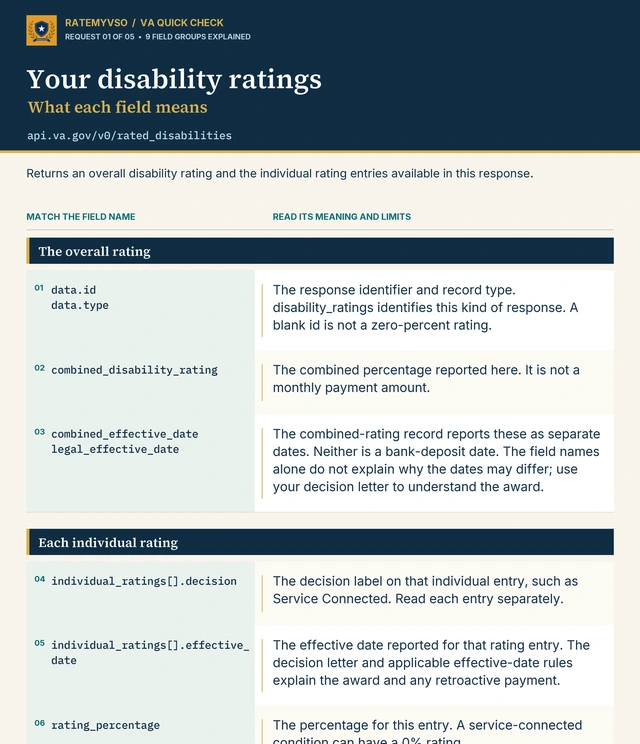
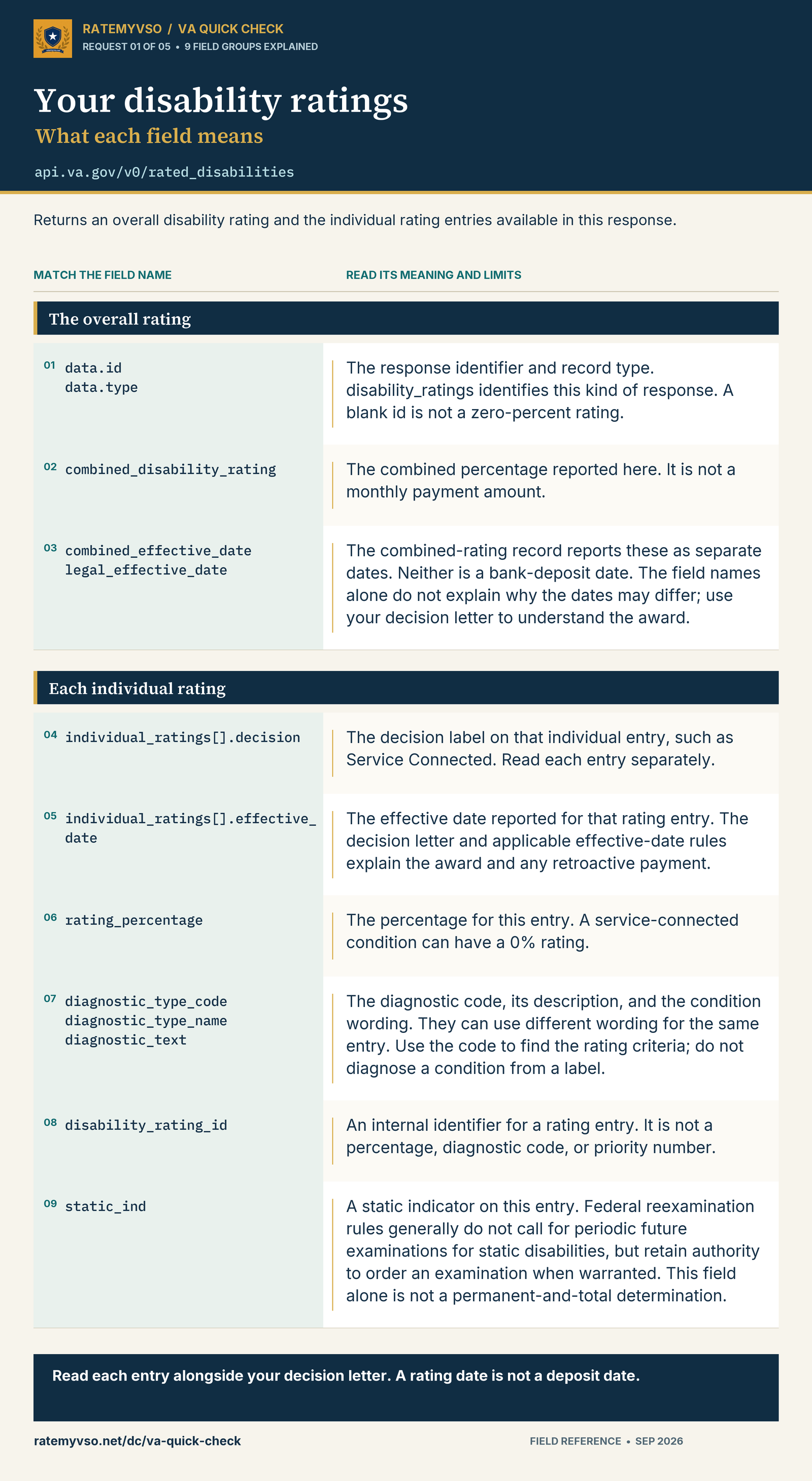
Returns an overall disability rating and the individual rating entries available in this response.
https://api.va.gov/v0/rated_disabilities
diagnostic_text: The rated condition; diagnostic_type_code identifies the rating criteria.rating_percentage / decision: Read the individual percentage and decision label together, including any 0% service-connected ratings.effective_date: The date for that rating entry. The combined record can contain separate effective dates; none is a deposit date.combined_disability_rating: Your overall percentage. The VA combines ratings rather than simply adding them.static_ind: A static indicator. This field alone does not establish permanent and total status.
See the complete field-reference graphic
Read the same field guide as text
- data.id / data.type
- The response identifier and record type. disability_ratings identifies this kind of response. A blank id is not a zero-percent rating.
- combined_disability_rating
- The combined percentage reported here. It is not a monthly payment amount.
- combined_effective_date / legal_effective_date
- The combined-rating record reports these as separate dates. Neither is a bank-deposit date. The field names alone do not explain why the dates may differ; use your decision letter to understand the award.
- individual_ratings[].decision
- The decision label on that individual entry, such as Service Connected. Read each entry separately.
- individual_ratings[].effective_date
- The effective date reported for that rating entry. The decision letter and applicable effective-date rules explain the award and any retroactive payment.
- rating_percentage
- The percentage for this entry. A service-connected condition can have a 0% rating.
- diagnostic_type_code / diagnostic_type_name / diagnostic_text
- The diagnostic code, its description, and the condition wording. They can use different wording for the same entry. Use the code to find the rating criteria; do not diagnose a condition from a label.
- disability_rating_id
- An internal identifier for a rating entry. It is not a percentage, diagnostic code, or priority number.
- static_ind
- A static indicator on this entry. Federal reexamination rules generally do not call for periodic future examinations for static disabilities, but retain authority to order an examination when warranted. This field alone is not a permanent-and-total determination.
Comparing percentages? Use the VA Math Calculator. Look up the diagnostic code to read its criteria.
02Your VA profile
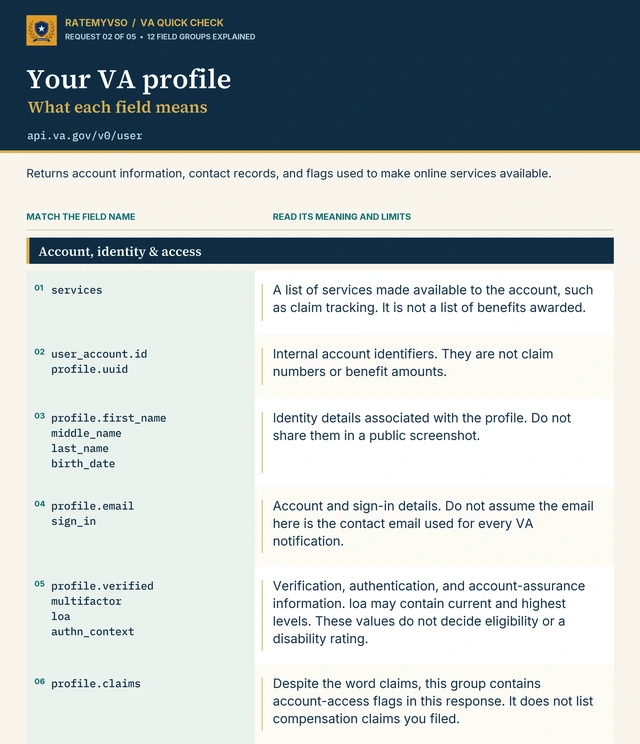
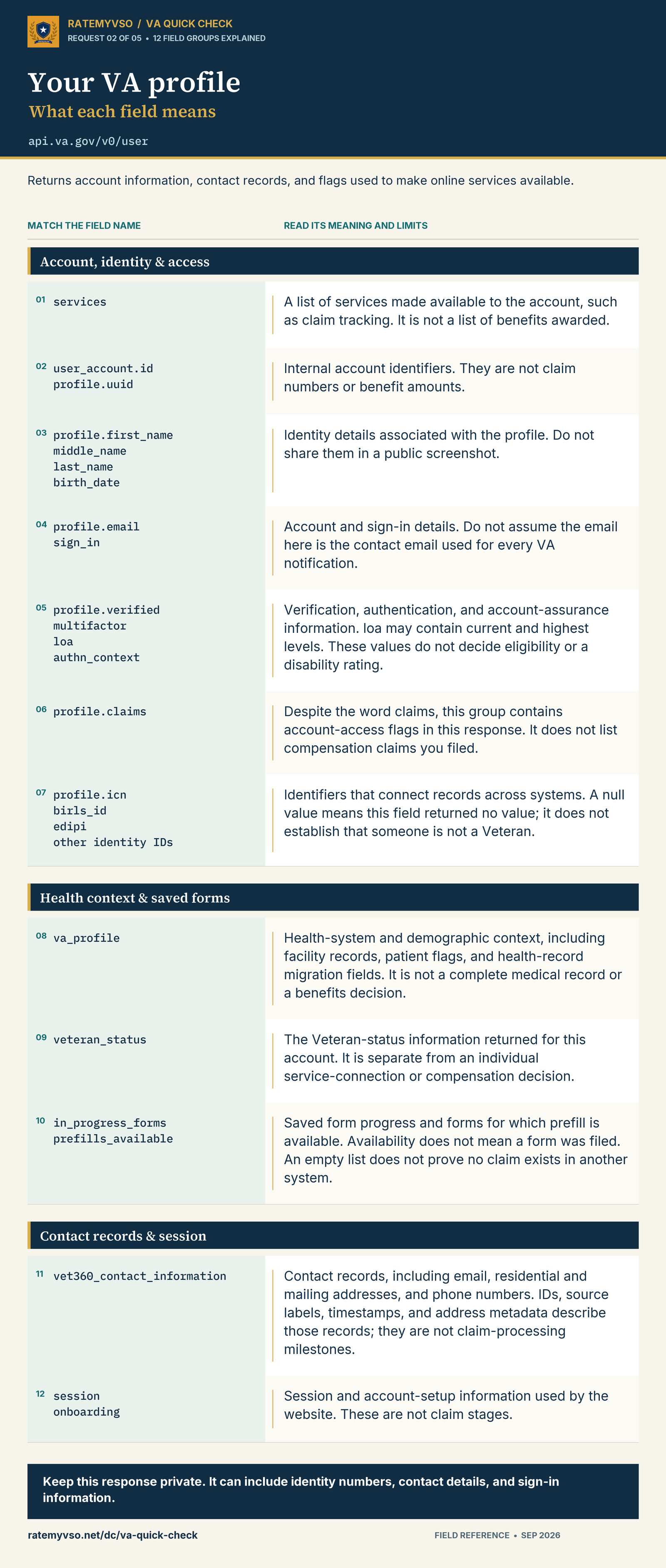
Returns account information, contact records, and flags used to make online services available.
https://api.va.gov/v0/user
first_name / middle_name / last_name: Your identity details in the profile.email / vet360_contact_information: Check which email is a sign-in address and which is a contact record.services / profile.claims: Features available to your account, not benefits awarded or claims filed.loa / verified: Account assurance and verification information. loa can contain current and highest levels.
See the complete field-reference graphic
Read the same field guide as text
- services
- A list of services made available to the account, such as claim tracking. It is not a list of benefits awarded.
- user_account.id / profile.uuid
- Internal account identifiers. They are not claim numbers or benefit amounts.
- profile.first_name / middle_name / last_name / birth_date
- Identity details associated with the profile. Do not share them in a public screenshot.
- profile.email / sign_in
- Account and sign-in details. Do not assume the email here is the contact email used for every VA notification.
- profile.verified / multifactor / loa / authn_context
- Verification, authentication, and account-assurance information. loa may contain current and highest levels. These values do not decide eligibility or a disability rating.
- profile.claims
- Despite the word claims, this group contains account-access flags in this response. It does not list compensation claims you filed.
- profile.icn / birls_id / edipi / other identity IDs
- Identifiers that connect records across systems. A null value means this field returned no value; it does not establish that someone is not a Veteran.
- va_profile
- Health-system and demographic context, including facility records, patient flags, and health-record migration fields. It is not a complete medical record or a benefits decision.
- veteran_status
- The Veteran-status information returned for this account. It is separate from an individual service-connection or compensation decision.
- in_progress_forms / prefills_available
- Saved form progress and forms for which prefill is available. Availability does not mean a form was filed. An empty list does not prove no claim exists in another system.
- vet360_contact_information
- Contact records, including email, residential and mailing addresses, and phone numbers. IDs, source labels, timestamps, and address metadata describe those records; they are not claim-processing milestones.
- session / onboarding
- Session and account-setup information used by the website. These are not claim stages.
03Your claims and requests
Returns claim and request records available in this list, with identifiers, statuses, and dates.
https://api.va.gov/v0/benefits_claims
id: The record number to use in the next address.claimType / displayTitle: Start here to distinguish compensation claims from FOIA or Privacy Act requests.status: The current processing label, such as INITIAL_REVIEW or COMPLETE. Complete does not mean granted.claimDate / closeDate: The recorded claim and closure dates. null means no value was returned for that field.claimTypeCode / endProductCode: Internal work codes. Do not identify a decision-review option just from a suffix such as SUPP.
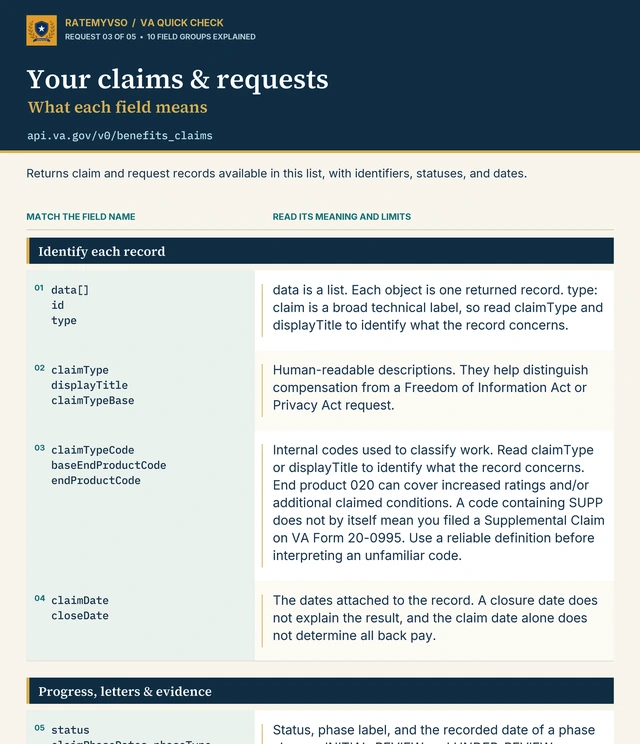
See the complete field-reference graphic
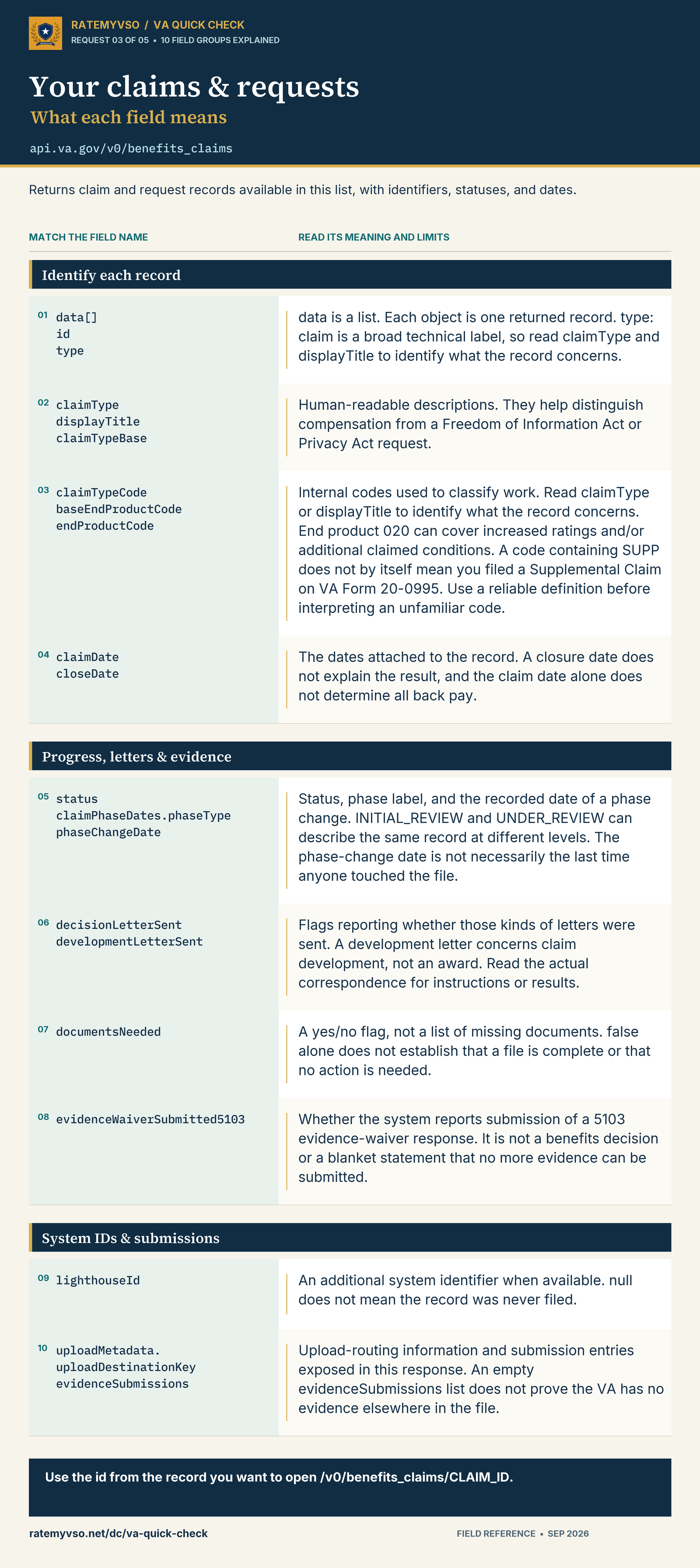
Read the same field guide as text
- data[] / id / type
- data is a list. Each object is one returned record. type: claim is a broad technical label, so read claimType and displayTitle to identify what the record concerns.
- claimType / displayTitle / claimTypeBase
- Human-readable descriptions. They help distinguish compensation from a Freedom of Information Act or Privacy Act request.
- claimTypeCode / baseEndProductCode / endProductCode
- Internal codes used to classify work. Read claimType or displayTitle to identify what the record concerns. End product 020 can cover increased ratings and/or additional claimed conditions. A code containing SUPP does not by itself mean you filed a Supplemental Claim on VA Form 20-0995. Use a reliable definition before interpreting an unfamiliar code.
- claimDate / closeDate
- The dates attached to the record. A closure date does not explain the result, and the claim date alone does not determine all back pay.
- status / claimPhaseDates.phaseType / phaseChangeDate
- Status, phase label, and the recorded date of a phase change. INITIAL_REVIEW and UNDER_REVIEW can describe the same record at different levels. The phase-change date is not necessarily the last time anyone touched the file.
- decisionLetterSent / developmentLetterSent
- Flags reporting whether those kinds of letters were sent. A development letter concerns claim development, not an award. Read the actual correspondence for instructions or results.
- documentsNeeded
- A yes/no flag, not a list of missing documents. false alone does not establish that a file is complete or that no action is needed.
- evidenceWaiverSubmitted5103
- Whether the system reports submission of a 5103 evidence-waiver response. It is not a benefits decision or a blanket statement that no more evidence can be submitted.
- lighthouseId
- An additional system identifier when available. null does not mean the record was never filed.
- uploadMetadata.uploadDestinationKey / evidenceSubmissions
- Upload-routing information and submission entries exposed in this response. An empty evidenceSubmissions list does not prove the VA has no evidence elsewhere in the file.
04One claim or request in detail
Returns the details available for one selected record. Replace CLAIM_ID with its id from the claims list.
https://api.va.gov/v0/benefits_claims/CLAIM_ID
Replace CLAIM_ID: If the record’s id were 700000001, the address would be https://api.va.gov/v0/benefits_claims/700000001. This is a fictional example; use the id from your list.
contentions: What the entry concerns: claimed conditions for compensation, or requested record types for FOIA.documentsNeeded / trackedItems: A yes/no flag and a separate list of tracked items. Read the actual correspondence for any action needed.claimPhaseDates.latestPhaseType: The phase in this detail response. A FOIA request may not follow the disability-compensation steps.supportingDocuments: Document entries returned here, which may include acknowledgement or development letters.minEstClaimDate / maxEstClaimDate: The estimated completion window, when present. It is not a guaranteed deadline.
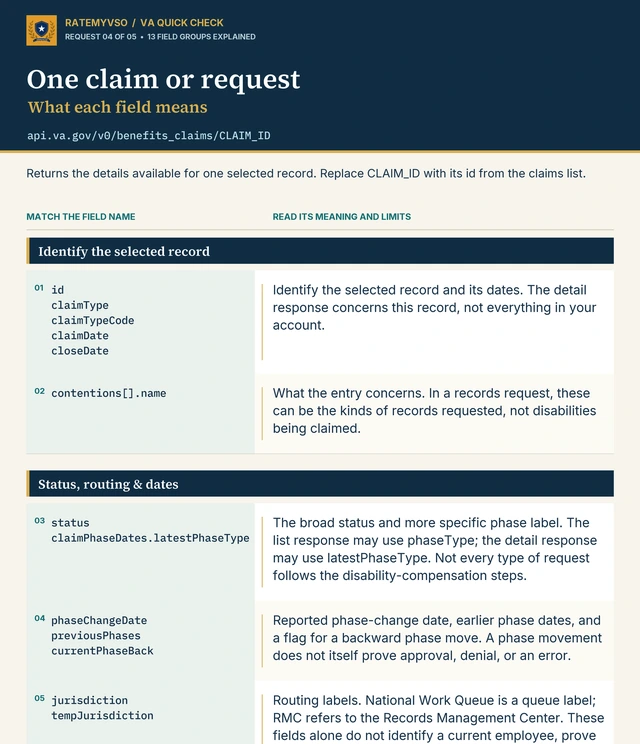
See the complete field-reference graphic
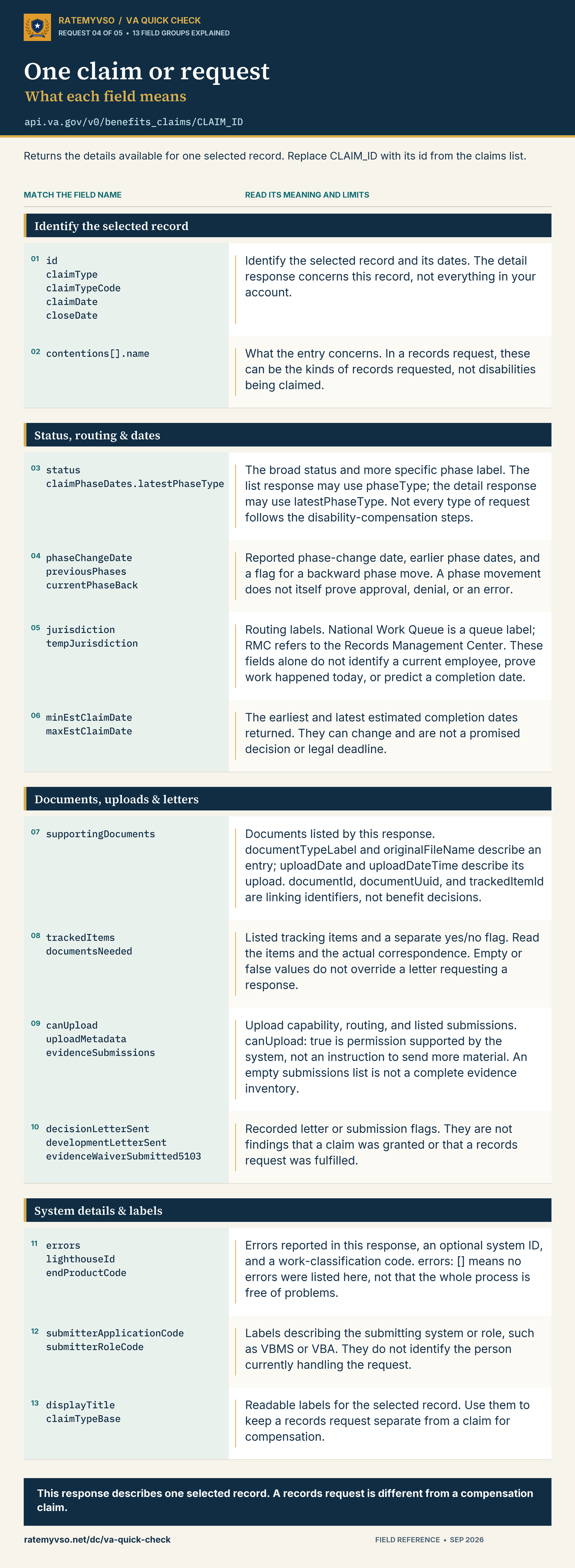
Read the same field guide as text
- id / claimType / claimTypeCode / claimDate / closeDate
- Identify the selected record and its dates. The detail response concerns this record, not everything in your account.
- contentions[].name
- What the entry concerns. In a records request, these can be the kinds of records requested, not disabilities being claimed.
- status / claimPhaseDates.latestPhaseType
- The broad status and more specific phase label. The list response may use phaseType; the detail response may use latestPhaseType. Not every type of request follows the disability-compensation steps.
- phaseChangeDate / previousPhases / currentPhaseBack
- Reported phase-change date, earlier phase dates, and a flag for a backward phase move. A phase movement does not itself prove approval, denial, or an error.
- jurisdiction / tempJurisdiction
- Routing labels. National Work Queue is a queue label; RMC refers to the Records Management Center. These fields alone do not identify a current employee, prove work happened today, or predict a completion date.
- minEstClaimDate / maxEstClaimDate
- The earliest and latest estimated completion dates returned. They can change and are not a promised decision or legal deadline.
- supportingDocuments
- Documents listed by this response. documentTypeLabel and originalFileName describe an entry; uploadDate and uploadDateTime describe its upload. documentId, documentUuid, and trackedItemId are linking identifiers, not benefit decisions.
- trackedItems / documentsNeeded
- Listed tracking items and a separate yes/no flag. Read the items and the actual correspondence. Empty or false values do not override a letter requesting a response.
- canUpload / uploadMetadata / evidenceSubmissions
- Upload capability, routing, and listed submissions. canUpload: true is permission supported by the system, not an instruction to send more material. An empty submissions list is not a complete evidence inventory.
- decisionLetterSent / developmentLetterSent / evidenceWaiverSubmitted5103
- Recorded letter or submission flags. They are not findings that a claim was granted or that a records request was fulfilled.
- errors / lighthouseId / endProductCode
- Errors reported in this response, an optional system ID, and a work-classification code. errors: [] means no errors were listed here, not that the whole process is free of problems.
- submitterApplicationCode / submitterRoleCode
- Labels describing the submitting system or role, such as VBMS or VBA. They do not identify the person currently handling the request.
- displayTitle / claimTypeBase
- Readable labels for the selected record. Use them to keep a records request separate from a claim for compensation.
Not sure what the file entries mean? Open the VA Claim Files Decoder.
05Decision reviews and Board appeals
Returns decision-review and appeal tracking information available for the signed-in account.
https://api.va.gov/v0/appeals
- Review type and description: Identify whether the record concerns Higher-Level Review, a Supplemental Claim, or a Board appeal.
docket: For Board appeals, information about the review option or queue, such as Direct Review, Evidence Submission, Hearing, or legacy.status.type / status.details: The process position and additional context, rather than a promise that every issue was granted.events / alerts: Reported timeline entries and notices that may need attention. Confirm deadlines in the official correspondence.issues: Read the individual matters, because one review can contain different results for different issues.
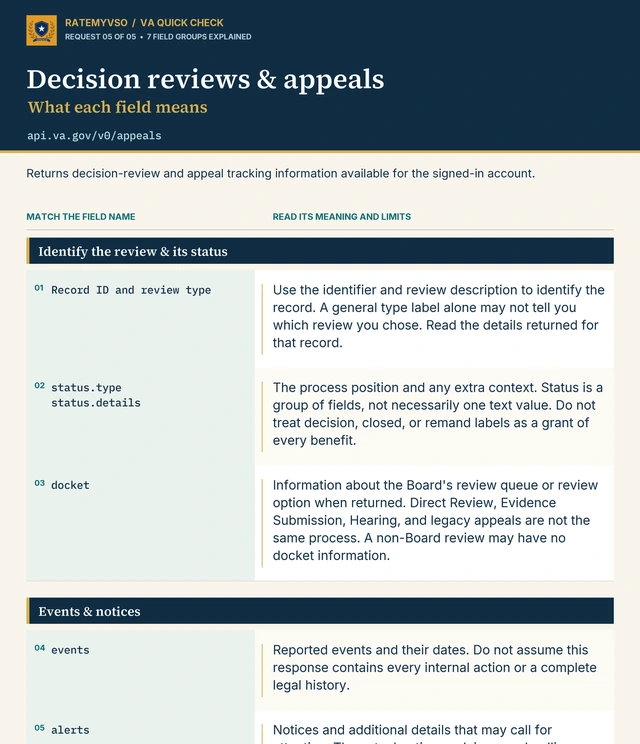
See the complete field-reference graphic
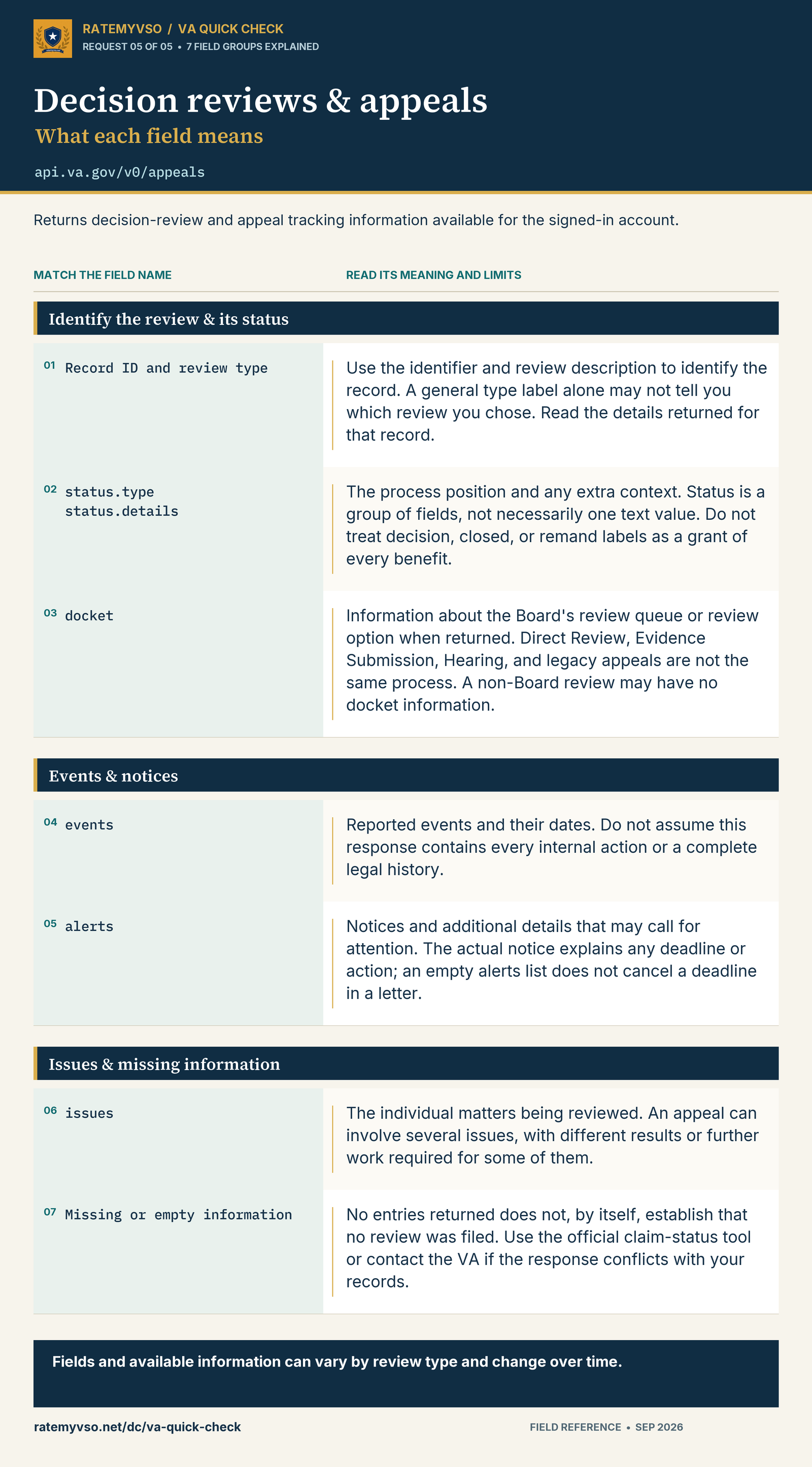
Read the same field guide as text
- Record ID and review type
- Use the identifier and review description to identify the record. A general type label alone may not tell you which review you chose. Read the details returned for that record.
- status.type / status.details
- The process position and any extra context. Status is a group of fields, not necessarily one text value. Do not treat decision, closed, or remand labels as a grant of every benefit.
- docket
- Information about the Board's review queue or review option when returned. Direct Review, Evidence Submission, Hearing, and legacy appeals are not the same process. A non-Board review may have no docket information.
- events
- Reported events and their dates. Do not assume this response contains every internal action or a complete legal history.
- alerts
- Notices and additional details that may call for attention. The actual notice explains any deadline or action; an empty alerts list does not cancel a deadline in a letter.
- issues
- The individual matters being reviewed. An appeal can involve several issues, with different results or further work required for some of them.
- Missing or empty information
- No entries returned does not, by itself, establish that no review was filed. Use the official claim-status tool or contact the VA if the response conflicts with your records.
Stay safe and compare options
Safety notes
- This page never sees your data. When you paste an address into your browser, the data goes from the VA's computers straight to your screen. RateMyVSO never receives any of it.
- Do not share screenshots of the response unless you have edited out personal information. The response can include your full name, email, claim numbers, and ratings.
- Stay signed in only as long as you need. When you are done, sign out of VA.gov so the address links stop working from your browser.
- If a link does not work, it usually means your sign-in session expired or access to that service changed. Try logging in again.
Why we are showing you these
VA.gov presents information in a readable view. These addresses let you inspect the underlying response, including details that may not be prominent on the status screen. Veterans can use this to:
- Compare the recorded claim date and effective dates with their own records and decision letters.
- Look for listed requests, tracked items, or development letters that may need attention.
- Check rating entries and compare them with the official decision, rather than relying on a status label alone.
- Review the contentions to see which conditions or requested records appear in this response.
Compare VA claim-tracking options
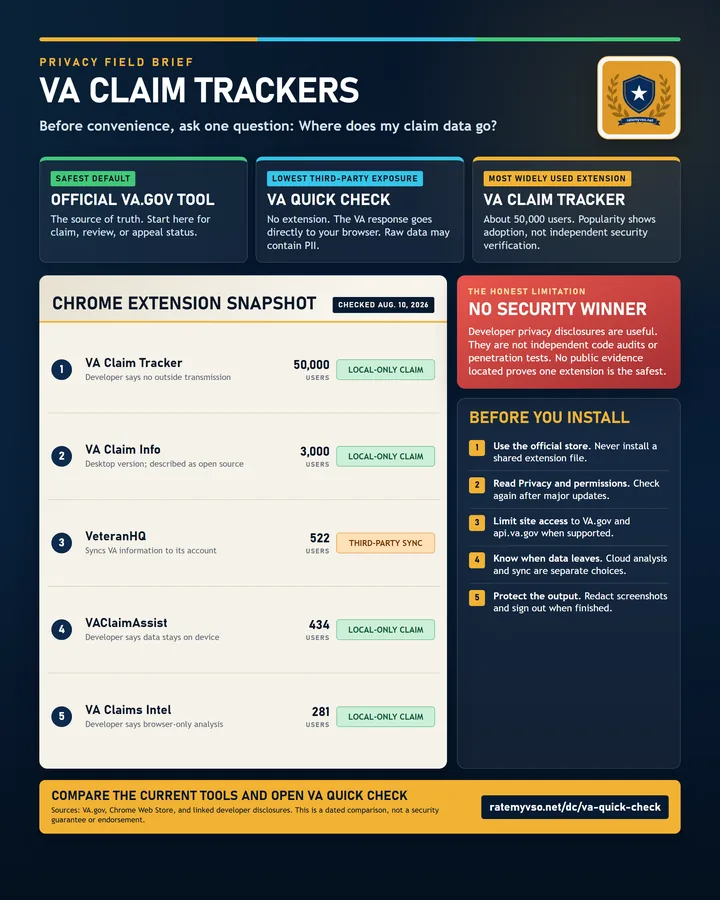
See where claim information goes when you use the official VA tool, VA Quick Check, or popular Chrome extensions.
View the comparison infographicSee the claim-tracking comparison
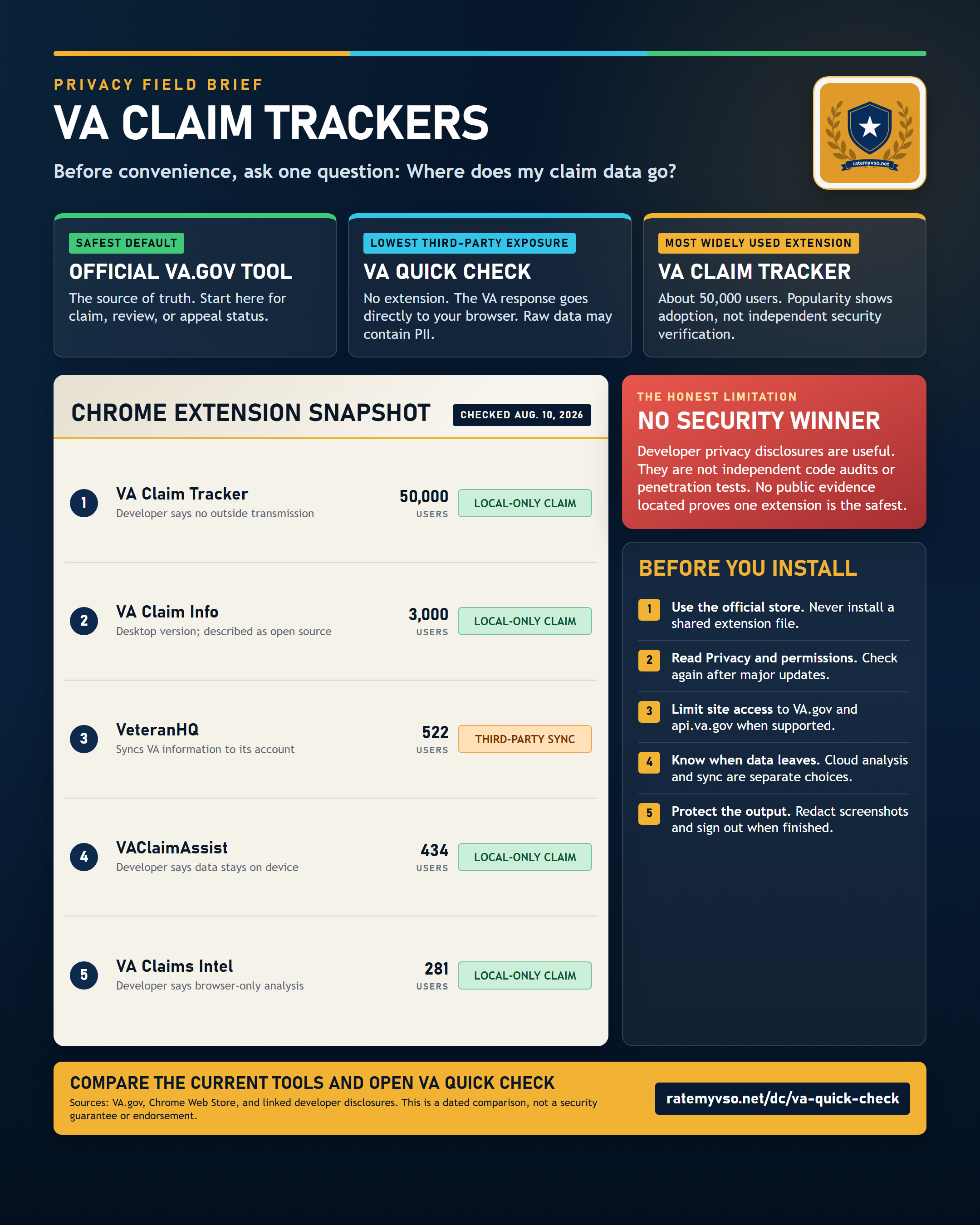
Prefer a one-click view? A free browser extension does this for you
If pasting web addresses is not your thing, VA Claim Tracker is a free Chrome extension that presents claim details such as phases, timelines, and updates on the VA.gov claim-status page. It is not RateMyVSO software. Review its current store listing and permissions before installing; the comparison above explains the privacy questions to consider.
Related Tools and Guides
This page is educational. These addresses request information from VA.gov’s signed-in services; access and field names can change. RateMyVSO is not affiliated with the Department of Veterans Affairs. For help with your claim, find a VSO representative.