How RateMyVSO Helps You Build Your Claim
This site is a powerful and free resource for veterans. RateMyVSO is built to help you research and file a VA Claim for Disability Compensation that gives you a fighting chance at winning the compensation you have earned. The VA Claim process can be intimidating, but with a little research and a bit of help you can learn all you need to know to build a solid claim file. These are tools on this site that can help you build a solid claim to submit or discuss with an accredited representative.

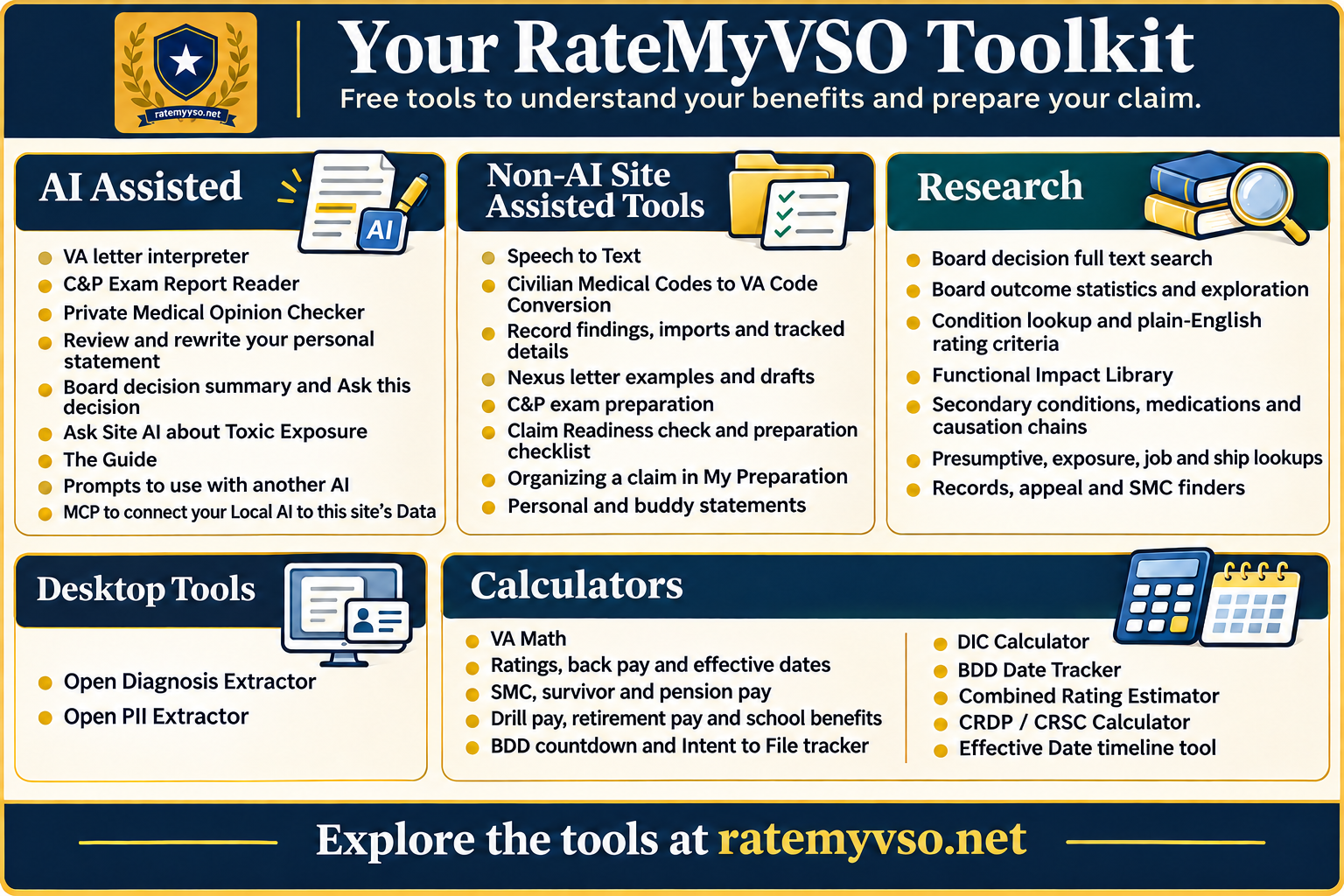
Read the whole chart as text
Your RateMyVSO Toolkit. Free tools to understand your benefits and prepare your claim.
AI Assisted
- VA letter interpreter
- C&P Exam Report Reader
- Private Medical Opinion Checker
- Review and rewrite your personal statement
- Board decision summary and Ask this decision
- Ask Site AI about Toxic Exposure
- The Guide
- Prompts to use with another AI
- MCP to connect your Local AI to this site's Data
Non-AI Site Assisted Tools
- Speech to Text
- Civilian Medical Codes to VA Code Conversion
- Record findings, imports and tracked details
- Nexus letter examples and drafts
- C&P exam preparation
- Claim Readiness check and preparation checklist
- Organizing a claim in My Preparation
- Personal and buddy statements
Desktop Tools
- Open Diagnosis Extractor
- Open PII Extractor
Research
- Board decision full text search
- Board outcome statistics and exploration
- Condition lookup and plain-English rating criteria
- Functional Impact Library
- Secondary conditions, medications and causation chains
- Presumptive, exposure, job and ship lookups
- Records, appeal and SMC finders
Calculators
- VA Math
- Ratings, back pay and effective dates
- SMC, survivor and pension pay
- Drill pay, retirement pay and school benefits
- BDD countdown and Intent to File tracker
- DIC Calculator
- BDD Date Tracker
- Combined Rating Estimator
- CRDP / CRSC Calculator
- Effective Date timeline tool
Explore the tools at ratemyvso.net.
AI Powered Tools
VA letter interpreter Writing AI
Paste a VA letter or upload it, and the interpreter explains each grant, denial, reduction or remand, the effective dates, payments and deadlines, in plain English. It points out spots that look inconsistent so you can check them. Before it sends anything, it reads scanned pages on our own server and shows you a preview where you can remove names. You can then ask follow-up questions about the same letter.
Open the letter interpreter (one free try, then sign in needed)
C&P Exam Report Reader Writing AI
This reads an exam report you already have. It pulls out the report's own questions and recorded answers, and finds the passages about the opinion, its reasons, the records reviewed, your own statements and flare-ups. Each finding points to the exact wording in the report. It is separate from preparing for an exam that has not happened yet.
On the letter interpreter page (sign in needed)
Private Medical Opinion Checker Writing AI
Give it a medical opinion you already have, and it looks for the parts reviewers tend to look for: the provider's credentials, the records reviewed, the facts relied on, the probability wording, the reasons, and the signature. For a secondary claim it also looks for causation and aggravation language. It shows the passage it found or says it could not find one. It does not say the opinion is medically or legally good enough.
Inside the nexus letter workspace (sign in needed)
Review and rewrite your personal statement Writing AI
The review reads a statement you saved and checks for five things: how often, how long, what it stops you doing, what help or changes you need, and one concrete example. It quotes your own words back and asks set follow-up questions. It does not rewrite anything.
The rewrite is a separate step you choose. It reorganizes your own words into a clearer first-person statement. A second pass flags anything that may have changed a fact, and a check rejects any number that was not in your text. Your version and the new one appear side by side, and you accept or refuse.
On My Statements (sign in needed)
Board decision summary and Ask this decision Writing AI
On a Board of Veterans' Appeals decision, the summary lists every issue and its outcome, the service facts, the reasons and anything left undecided. Each point links back to the numbered passage it came from, and you can download it as text. Ask this decision answers one question about the open decision in a sentence or two, with up to three quoted passages, or says the answer is not in the decision. From the same search you can save a search and get an email when new decisions match.
In BVA Decision Search (sign in needed)
Toxic Exposure Ask Writing AI
Ask a question about burn pits, Agent Orange, PFAS or another exposure, and it answers only from this site's exposure pages and job noise listings, with quotes and links. You can ask a few follow-ups. It hands a question about Board decisions to the Guide instead.
On the toxic exposure hub
The Guide Writing AI
The Guide is the "Ask" box on guide pages and across the site. It finds passages from our guides, condition pages, the regulations and the VA manual, then writes a short explanation with links to where it found them. On a guide page it starts from that guide. It can also find Board decisions that match a question, and when it shows a chart of Board outcomes, the chart comes from the condition's real figures, not from the AI's writing.
On guide pages such as the Claim Filing Guide, and from the site's Ask button
Prompts to use with another AI No AI call
If you would rather use your own AI app, we publish ready-made instructions you can copy into it, for reading a VA letter or for general claim questions. Copying them sends nothing to us and costs nothing.
Logic Driven Tools (no AI)
These tools compare the meaning of your words with our pages and codes. They rank and match. They write nothing. Most of the work runs on our own server.
Match your words to VA codes Meaning match
Describe a condition in your own words, or point it at a saved statement, and it suggests diagnostic code pages that may be related. It uses a small open-source model on our server plus keyword search. You can choose to have Jev, from TypeSafe, re-rank the suggestions. If that service fails, you get the server's own order. These are pages to read, not a diagnosis.
On My Statements (sign in needed) and the condition lookup
Site search that understands meaning Meaning match
Search combines exact word matching with meaning matching across the guides, code pages, the VA manual and other pages, so "my knee gives out" can find pages that never use those words. The same kind of meaning match connects everyday symptom descriptions to diagnostic codes.
Find similar Board decisions Meaning match
Describe a condition, a theory of connection and a short story, and it finds published Board decisions that read similarly, with outcome filters and excerpts. When the meaning index is not available, it falls back to plain word search.
Speak instead of typing Your browser
In the statement editor and some description boxes you can dictate. Your browser turns speech into text. The recording does not come to us, though your browser's maker may process it. You check the text before saving.
On My Statements (sign in needed)
Translate medical codes to VA codes Rules and math
Enter an ICD-10, ICD-9 or SNOMED code from your records and it looks up VA diagnostic codes that may apply, using published crosswalk tables. When a code has no clear match, it says so instead of guessing.
Preparing From Your Own Saved Work
These tools make no AI call. They keep what you save and reuse it when you build a document. Where something is copied from one tool to another, a fixed map decides where it goes. Nothing guesses from your writing. Claim Preparation Tools is the place to start, and the paragraphs below explain how the pieces work.
Your claim journey Rules and math
Pick conditions or body areas and it builds a route through the guides and tools for them. It keeps track of which condition is secondary to which, and tells a left knee from a right knee. A saved journey reopens with your choices.
Record findings, imports and tracked details Rules and math
You can save diagnoses, symptoms and procedures from your records, each with its document, page, date and your notes, and file them under a condition. If you use our free Diagnosis Extractor program, you can import its export. You review each entry and save only what you pick. Medications, surgeries and condition status stay as your own entries, not as verified record findings. A symptom finder shows what Board decisions and medical references describe for a saved condition, kept apart from your own words.
In My Preparation (sign in needed)
Guide worksheets and decision-letter worksheets Rules and math
Many condition guides have worksheets that save your answers and link them to a claim. Pages about rating decisions, denials, reductions and appeals open a worksheet for reading your letter that matches the condition. If no worksheet fits, the page says so instead of handing you a different one.
For example the anxiety claims guide and the appeals guide (saving needs sign in)
Nexus letter examples and drafts No AI
The nexus letter pages show fictional examples, a generic example and blank drafts. You can insert a saved record finding with its source after you confirm it. Drafts stay in your browser and print on paper. Each carries a label asking your clinician to review, change or decline it. No AI writes them.
Nexus letter guide and the nexus letter workspace (sign in needed)
C&P exam preparation Rules and math
The Exam Prep kit builds a sheet for one condition: diagnoses, symptoms, how it affects your life, records and treatment. It can fill fields from your saved findings, statements, worksheet answers and tracked details, using a fixed map of which answer goes where, and it notices when a source has changed. The DBQ page picks the sections and questions of the official exam form that apply to your condition. Both prepare you. Neither fills in the examiner's form.
Readiness check and preparation checklist Rules and math
The Claim Readiness Check scores how complete your answers are, with different questions for a first claim, an increase and a supplemental claim. A complete score is not a chance of approval. The checklist tracks preparation tasks for each condition and for the whole claim, counts what you have actually saved, and respects what you mark done yourself. A step-by-step guide explains the stages and links to each tool.
Claim Readiness Check (saving needs sign in), claim preparation steps, and the checklist in My Preparation (sign in needed)
Organizing a claim in My Preparation Rules and math
My Preparation brings your worksheets, findings, statements, record requests, dates, saved cases and drafts together for each condition and for the whole claim. A pathways organizer records the connection you think applies, such as direct, secondary, aggravation or exposure, and asks follow-up questions for that path without choosing it for you. Increase and supplemental preparation keeps each issue, the earlier decision, your explanation and your chosen sources together.
A condition brief shows what is saved, what is still open and your next step. You can pick questions for a doctor's appointment and print them on one page, keep a records-request tracker and a timeline of dates, and print a packet of what you choose, rechecked against the latest version of each source. Tracking a request does not mean VA has the document.
In My Preparation (sign in needed)
Personal and buddy statements Rules and math
The site keeps your own statements apart from statements by other people, links each to the right claims, and lets each carry a private PDF. The AI review and rewrite above work only on your own personal statement.
On My Statements (sign in needed)
Saved research Rules and math
You can save Board cases, interpreted letters, code bookmarks, your existing conditions and calculator results to your account and pick them up later. Saving a bookmark is not sending evidence to anyone.
On your profile (sign in needed)
Research and Lookup Tools
These tools search and count. We prepared some of the data behind them ahead of time with AI help, as the last section explains, but browsing them makes no new AI call.
Board decision search Rules and math
Full-text search of published Board decisions, narrowed by condition, secondary condition, branch, theory, claim type, outcome, dates, evidence and more. The filters look at the issue you picked, so a decision that granted one thing and denied another is not counted the wrong way.
BVA Decision Search (sign in needed)
Board outcome explorers Rules and math
Charts of past Board outcomes by condition: grants, denials and remands, the reasons given, evidence and opinion patterns, representation, exam problems and rating changes. They describe what happened in past decisions, not your chances.
Court precedent search Rules and math
Search Court of Appeals for Veterans Claims cases, read summaries, and see which Board decisions cite each one. We prepared some summaries ahead of time with AI help.
CAVC precedent search (sign in needed)
Condition lookup and plain-English rating criteria Rules and math
Find a diagnostic code by condition name, medical code, other names or body area. The filing-terms page connects the condition names on VA's claim form to our code pages. Each code page puts the official rating criteria next to a plain-English version. We wrote the plain-English text ahead of time with AI help. It is not a prediction of your rating.
Condition lookup, filing terms, and code pages such as high blood pressure
Functional Impact Library Prepared data
Examples, drawn from Board decisions, of how conditions affect work and daily life. We gathered the examples ahead of time with AI help. They are other veterans' situations, not facts about you.
Secondary conditions, medications and causation chains Rules and math
See which conditions veterans have claimed as secondary to another, in which direction, and what the decisions said about how. Related pages show medication side effects the Board has granted and conditions linked through an in-between step, and keep claims about VA treatment separate.
Secondary Conditions Explorer, secondary conditions finder, medication side effects and causation chains
Presumptive, exposure, job and ship lookups Rules and math
The presumptive checker shows which presumptive categories may be relevant to the eras, places and exposures you pick. It cannot confirm you qualify. The exposure pages find agents by name or linked condition, with PFAS lookups by base and state. The job lookup matches a military job to noise ratings and occupational exposure research. The ship pages match ship names and hull numbers to VA's ship list and point to deck log requests.
Presumptive checker, exposures, PFAS, exposures by military job, ships list and ship records
Records, appeal and SMC finders Rules and math
The records finder uses the record type, branch and service dates you pick to show the right request form and address. The appeal explorer shows which review routes stay open after a decision and the time limits. It does not rank them or predict success. The SMC finder points to Special Monthly Compensation guides that match what you select. It is not an entitlement decision.
Records request finder, appeal explorer and SMC levels and finder
Regulations and the VA manual Rules and math
The rating regulations and the VA adjudication manual, linked to condition pages and Board research. The Guide and the letter interpreter also read from them.
Benefits lists, knowledge checks and finding help Rules and math
Filter benefits by rating and by state, each with its own rules and source. Some guides end with a short quiz to check what you read. It scores your reading, not your claim. The representative finder searches accredited representatives and offices by name and location, with no AI ranking or endorsement.
Benefits by rating, state benefits, the quiz on the Claim Filing Guide, and find a representative
Calculators, Deadlines and Reminders
Every calculator here is plain arithmetic on published rate tables and date rules. No AI. Each result is an estimate.
Ratings, back pay and effective dates Rules and math
The combined rating calculator uses VA's combined ratings method and the bilateral factor, shows each step, and lets you try what-if scenarios. The back pay estimator walks month by month through rate periods. The effective-date calculator covers an ordinary first claim and a later review, and sends unusual cases elsewhere instead of guessing.
Combined rating calculator, back pay estimator and effective-date calculator
SMC, survivor and pension pay Rules and math
Estimate SMC pay and SMC back pay by level and dependents, survivor DIC payments, and Veterans and Survivors Pension from income, medical expenses and assets.
SMC pay, SMC back pay, DIC, pension calculator and the pension guide
Drill pay, retirement pay and school benefits Rules and math
Compare drill pay with VA compensation for the days you enter, CRDP with CRSC using your award and retirement figures, and VR&E with the GI Bill for your school's location.
BDD countdown and Intent to File tracker Rules and math
The BDD countdown works out the 180-to-90-day window before separation. The Intent to File tracker keeps your filing date and its expiration, and keeps an estimated date apart from one VA has confirmed. Both can email you reminders using the same date rules you see on the page.
BDD countdown (saving needs sign in) and Intent to File tracker (sign in needed)
Email updates Rules and math
If you sign up, the site can email you preparation reminders as your claim ages, a digest of research for the conditions and state you saved, and Board Watch updates. These emails pick from published data on a schedule. No AI writes an assessment of your claim. You choose them in your account settings.
Using RateMyVSO From Your Own AI App
The connector for ChatGPT and Claude Read-only connector
If you use ChatGPT or Claude, you can connect them to RateMyVSO. Your AI app can then ask the site two kinds of questions: a research question, which returns relevant pages, Board material and source links, and a condition lookup, which returns rating criteria, Board outcomes, secondary conditions, exposures and exam details for one condition. Your own AI writes the answer. The site receives the question your AI sends for each lookup and does not store its words. The connector cannot read My Preparation, cannot see a private claim file, and cannot file anything. You can disconnect it from your profile at any time.
Set up the connector (connector account needed)
Desktop Programs and Prepared Data
Free desktop programs Runs on your computer
Two free programs run on your own computer. The Diagnosis Extractor pulls diagnosis codes out of medical records so you can import them into My Preparation. The Open PII Extractor removes personal details from a VA letter before you share it. This page describes only how the site offers and imports from them.
Data prepared ahead of time
We prepared some research data once, in advance, with AI help: the theories, evidence and findings tagged on Board issues, functional impact examples, Court summaries, condition summaries and the plain-English rating text. When you browse those pages you read the saved results. The site makes no new AI call. Separately, the site watches for changes to the rating regulations and flags affected pages for a person to review. That watch does not make legal judgments.
Related Tools and Guides
This page describes how the site's tools work. It is not legal advice, and no tool here files a claim or decides one. For help with your own claim, work with a VA-accredited representative.